

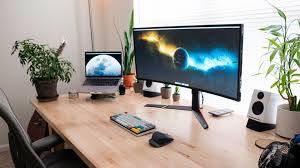
Your digital environment plays a major role in how comfortable your screen time feels. A well-adjusted workspace can reduce unnecessary strain and help you stay focused for longer periods.
One of the most important factors is screen brightness. Your display should match the lighting in your environment—neither too bright nor too dim. Excessive brightness can feel harsh, while low brightness may cause you to strain to see clearly.
Text size and contrast also matter. Increasing font size and using clear, readable colors can make content easier to view without effort. Many devices offer accessibility settings that allow you to customize your display according to your preference.
Lighting in your workspace should be soft and evenly distributed. Avoid placing your screen directly in front of a bright window or under strong overhead lighting, as this can create glare. Positioning your screen to minimize reflections can improve comfort.
Screen position is another key element. Ideally, your monitor should be at eye level and about an arm’s length away. This helps maintain a natural posture and reduces the need to lean forward or squint.
Taking time to adjust your setup may seem small, but it can have a lasting impact on your daily comfort. A well-designed workspace supports both focus and ease of use.